How to Deploy an AI Agent Without Complex Infrastructure
Making an AI agent that works on your laptop is easy. Making one that works reliably in production for real users without turning your weekend over to DevOps is much harder. This guide covers what an AI agent needs to run in production, how to deploy it step by step, what mistakes to avoid, and when a managed platform is the way to go.
Why Deploying an AI Agent Is More Than Just the Model
When people ask "how do I deploy an AI agent", they tend to imagine a single monolithic unit, like an LLM answering questions. An agent is actually a system, not a model, and the model is just one component.
The AI Model Is Just One Component
A production-grade AI agent typically includes: LLM or model API to do the thinking and generation Agent logic to decide which tools to call and when A backend or API to receive HTTP requests and return responses Database to store users, conversations, and application data Vector database for memory and RAG functions File or object storage for documents, uploads, and outputs Authentication to secure the agent and control access Background workers for tasks not needing HTTP Monitoring to keep track of failures Omit any of these and you will most likely find out in production, facing a user.
Where Infrastructure Complexity Starts
Each of these elements is often a separate service. The backend is one service, the database another, and the vector store yet another. There's also the workers, the model, the secret management, and the network between them. Each of these services has a dashboard, a bill, a set of credentials, and a way to fail. Nothing about that is difficult on its own, but for a small team, the combination can consume more time with infrastructure than building the agent itself.
What Infrastructure Does an AI Agent Need?
Here is a list of the core components and what they are responsible for.
Compute for the Agent
Computing resources to run the agent on. The choice here is typically between CPU and GPU. You need a GPU if you are self-hosting a model, such as an open source LLM, an embedding model, or a speech or vision model. Self-hosting provides more flexibility with data, latency, and cost per request, but requires appropriately sized GPU memory. If you are calling a model API (OpenAI, Anthropic, Google, etc.), then your compute is more likely to be CPU-only. Your server would mostly act as an orchestrator for the model, calling APIs and tools for the agent. As a rule of thumb, if you are not doing model inference yourself, you want to choose CPU.
Database and Persistent Storage
To run an agent you need somewhere to store information that needs to persist beyond single requests. A relational database typically stores: User information such as accounts, roles, and settings Conversation history so the agent keeps track of context across messages Application data such as tasks, records, and results Agent state such as workflow progress, tool outputs, and checkpoints You can't rely on local disk on a single server for any of this, since the data would disappear if the server is reinstalled. Make sure you are using a managed database and persistent storage for anything you can't afford to lose.
Vector Database for AI Memory and RAG
If you want your agent to answer questions using your own documents, product data, or knowledge base, it will need a vector database. This is typically done using retrieval-augmented generation (RAG): Your content is split into chunks Each chunk is converted to an embedding, a numeric representation of its meaning The embeddings are stored in a vector database At query time, the vectors most similar to the user input are retrieved The retrieved content is used as context for the model This allows your agent to base answers on your content, while still using an LLM for generation, and can serve as long-term memory across conversations.
Background Workers for Long-Running Tasks
Long-running tasks not related to an HTTP request should be handled by background workers. Some common tasks that should not be handled directly by an HTTP server include: Document processing such as parsing PDFs and generating embeddings Data ingestion from APIs, files, or databases AI workflows with multiple steps, retries, and tool calls Batch processing across many records Scheduled tasks such as nightly syncs and recurring reports
Monitoring and Logging
An agent can fail in many ways, such as a model call timing out or a background worker task failing. You want to know when this happens, and you want to know enough to actually debug the issue. Monitoring typically covers: Application health and uptime Errors and failed requests Latency, including time spent on model calls CPU, memory, and (if applicable) GPU utilization Failed or stalled background jobs Without logging and metrics, debugging a production agent can be challenging.
How to Deploy an AI Agent Step by Step
The steps to deploy will vary by platform, but the concepts are similar.
Prepare Your AI Agent Application Make sure your project is organized for production before deployment. Keep your code well-structured with the API/entry point separate from agent logic and configuration. List your application's dependencies in a file such as requirements.txt, pyproject.toml, or package.json Define a start command (such as uvicorn app.main:app --host 0.0.0.0 --port 8000) Define a health check endpoint (such as /health) so the platform knows your app is healthy Make sure the app reads configuration from environment variables rather than hard-coded values
Connect Your Git Repository Git-based deployments let you deploy a version of your application by pushing code to a branch. You connect your repository and branch to the platform and each push can become a release. This is repeatable and predictable, and avoids manually transferring files.
Configure Environment Variables and Secrets Your application will need secrets and environment variables for many purposes: Model and API keys Database credentials Tool and API credentials Application secrets (such as session or signing keys) Store these as environment variables or in the platform's secret manager, but never in your repository, even a private one.
Choose CPU or GPU Compute Select the type of CPU or GPU compute to use for your application. Typically, you would pick CPU if: The agent calls hosted model APIs The agent uses a hosted embedding API for RAG You pick GPU if: You are self-hosting a large LLM or embedding model You are using image, audio, or vision models you are managing
Connect Your Database and Vector Database Provision your database and vector store, and provide the connection strings to your application in environment variables. Run your schema migrations and make sure your application can both write application data and read embeddings. You can do this before deploying traffic to it.
Configure Background Workers Move long-running or asynchronous tasks to background workers. A typical pattern for background processing is: The API accepts a request and adds a task to a queue A background worker dequeues the task and performs the heavy lifting The result is stored and the user can poll or be notified This keeps the API fast while offloading work.
Add a Custom Domain and SSL Point your own domain (such as agent.yourcompany.com) to your deployed service and enable HTTPS. SSL is essential for both security and browser compatibility, and most platforms will provision and renew certificates for you.
Monitor and Scale the Application Monitor your application to understand when you need to scale or optimize performance. Key metrics to watch include: CPU and memory utilization Request volume and response times Error rates Traffic patterns, including traffic spikes Queue length for background jobs Use this information to make decisions about scaling vertically (larger instances) or horizontally (more instances), and potentially use autoscaling for predictable patterns.
Common AI Agent Deployment Mistakes
Deploy All Components on the Same Server
While putting an API, database, and workers on a single server is fine for a prototype, in production, one memory leak or crash takes everything down.
Use separate services for your database, workers, and model if possible.
Use a GPU Compute Instance When Not Needed
GPUs are significantly more expensive than CPUs. If you only ever call hosted model APIs, you do not need a GPU.
Ignore Persistent Storage
Storing conversation history or uploaded files on an instance's local disk will lead to data loss when the instance reboots or is redeployed. Use managed databases and persistent or object storage.
Call Long-Running Tasks from the Web Server
A web request that runs for two minutes is likely to time out or lock out other users. Offload such tasks to background workers.
Do Not Plan for Traffic Spikes
A successful launch, social media post, or customer onboarding batch can cause your traffic to explode overnight. Know your limits and set up scaling and rate limiting, including with your upstream model APIs.
Do Not Set Up Monitoring
If you are only finding out about issues from users, you are already behind. Set up logs, error tracking, and alerts before launch.
When Should You Use a Managed AI Infrastructure Platform?
You can build every layer yourself, using separate vendors. For some teams, that is the right option, especially if they have specific compliance or networking needs and the resources to manage it.
You may want a managed infrastructure platform if: Your team is small and should be focusing on the agent, not the infrastructure You need several pieces: web services, GPUs, databases, vector databases, workers, and storage You want a single dashboard for monitoring, SSL, custom domains, and scaling You need to go from prototype to production and want to reduce complexity You want to reduce the number of vendors, dashboards, and billing statements to manage The trade-off is flexibility.
Before committing to a platform, make sure it supports the particular services, regions, and compliance needs you require.
Deploy an AI Agent Without Managing Multiple Infrastructure Layers
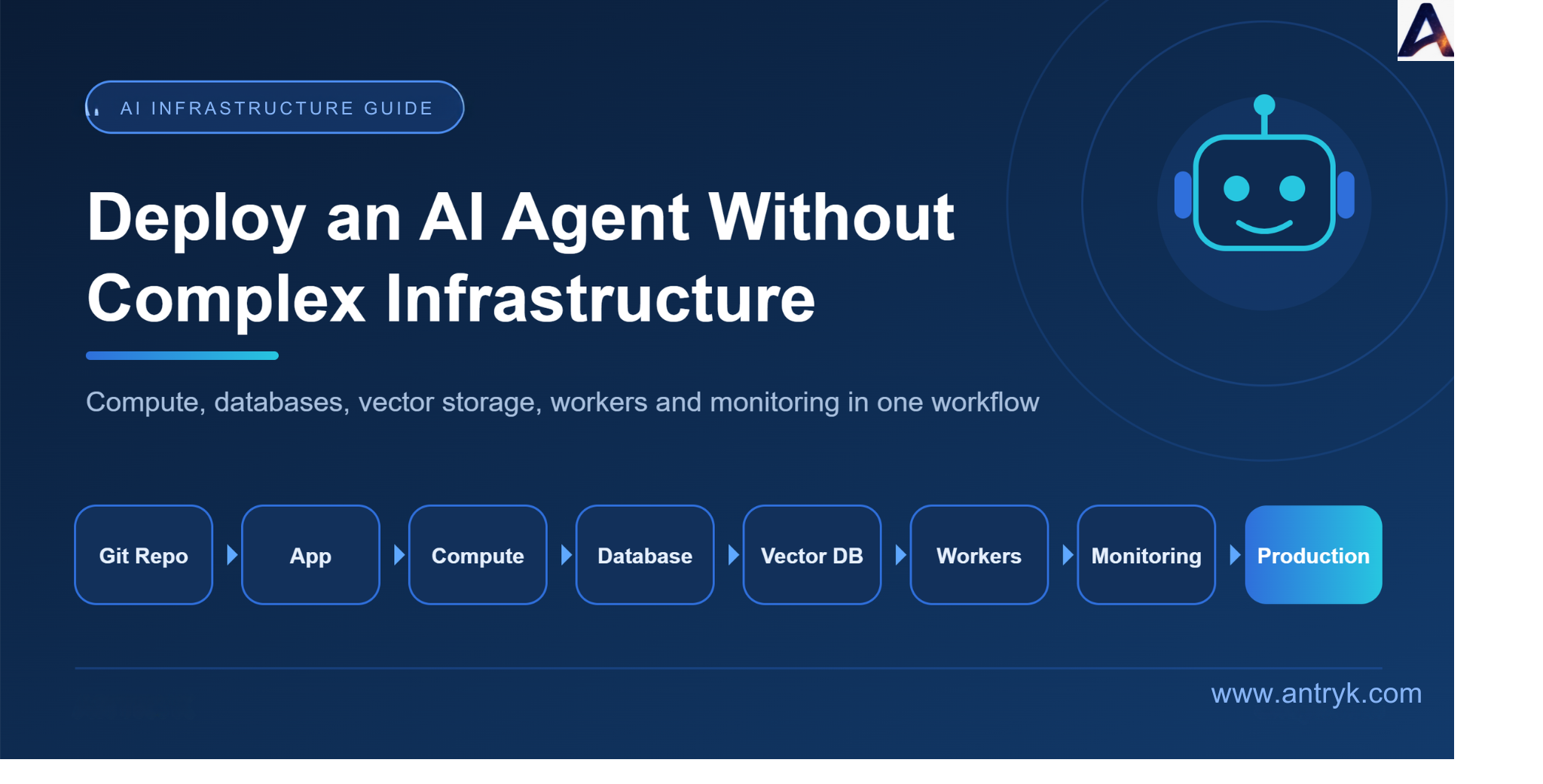
A managed platform reduces the complexity by abstracting away the separation between services. Instead of configuring multiple services, you go through a single process: Git Repository → Application → Compute → Database → Vector Database → Background Worker → Monitoring → Production All configuration is done in a centralized location. The connection strings, secrets, logs, and scaling information are all in one place, reducing the number of tools you maintain or configure. It also makes debugging easier, since you are not jumping across multiple dashboards to find the root cause of an issue.
How Antryk Simplifies AI Agent Deployment
Antryk is built to provide everything an AI agent needs in one place. It supports:
Web services for your AI agent's API and backend
GPU workloads for self-hosted models
Databases for application data, users, and conversation history
Vector databases for RAG and agent memory
Background workers for long-running and scheduled tasks Storage for documents, uploads, and outputs
Custom domains and SSL for production access Monitoring for health, performance, and errors
Autoscaling to handle changing demand
Git-based deployments so every push to your repository can become a release
This allows you to connect your repository, add the services your agent needs, and run it in production without setting up multiple infrastructure vendors for each layer.
Ready to move your AI agent from development to production?
Explore Antryk to deploy your application, connect the infrastructure it needs, and scale as your workload grows. Explore Antryk
Conclusion
Deploying an AI agent means understanding what other components are needed, such as data storage, memory, background tasks, security, and monitoring. Keeping the agent's architecture simple while making sure components that should scale can do so independently is essential to reducing complexity. And making sure you choose the infrastructure that does not add more complexity than your agent itself.
Build your AI agent. Deploy the infrastructure. Scale when you're ready.
SEO details Meta title: How to Deploy an AI Agent Without Complex Infrastructure Meta description: Learn how to deploy an AI agent with the right compute, databases, vector storage, background workers, monitoring, and scaling infrastructure. URL slug: /blog/deploy-ai-agent-without-complex-infrastructure