What Deploying an AI App Actually Requires
Building AI-powered applications is easier and more accessible than ever. Thanks to AI coding assistants, APIs, open-source models, and ready-made frameworks, many applications can go from idea to working prototype surprisingly fast.
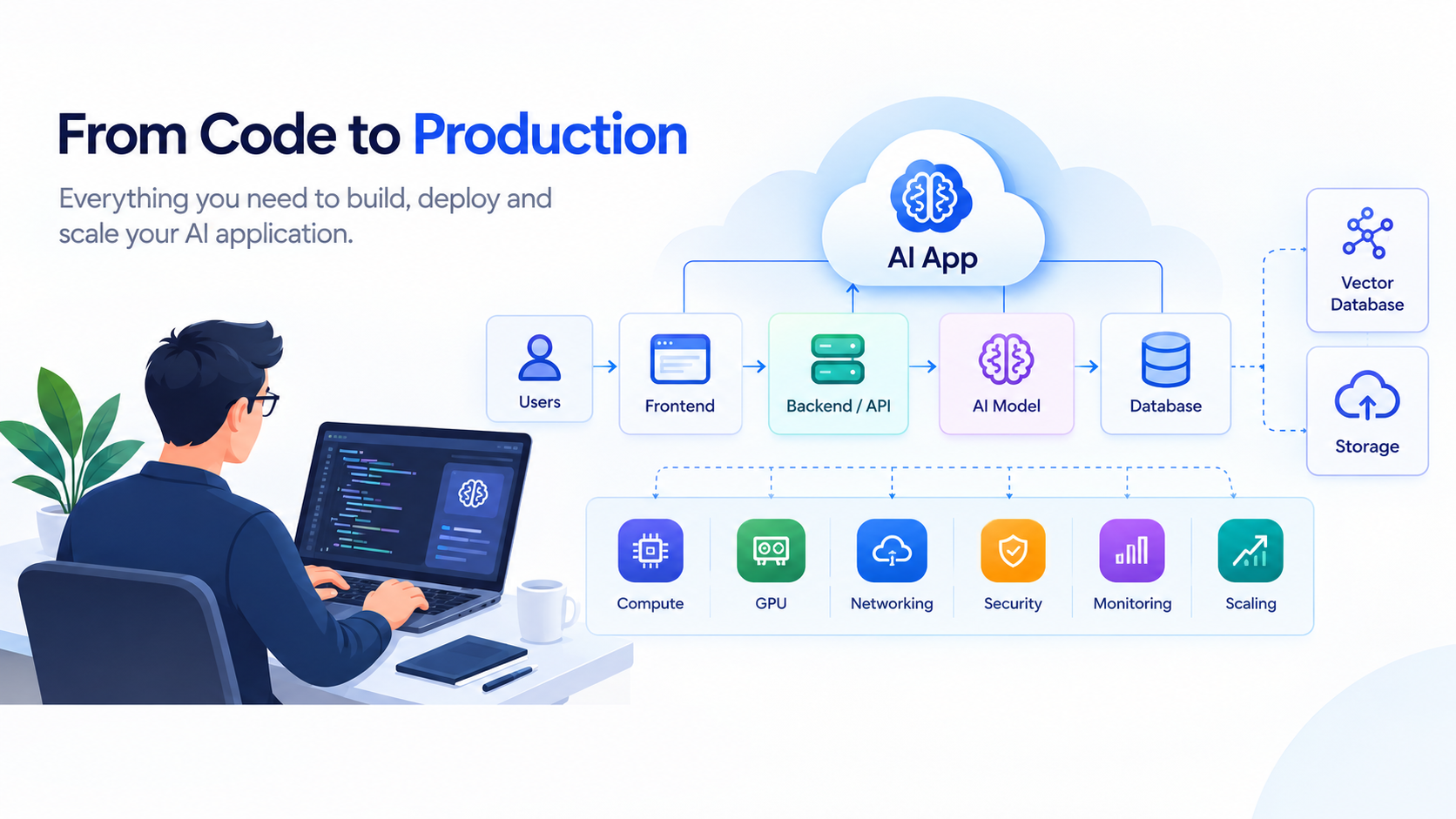
Deploying an AI app to production, however, has more to it than just getting it working on your own laptop. Depending on the application, you may need to consider compute, model serving, storage, databases, APIs, security, networking, monitoring, scaling, and cost in order to get your application out to end-users reliably. An AI app may also require GPU infrastructure and a vector database.
This is why an AI application that works just fine in development can have wildly differing behaviors under real-world user load.
In this guide, we'll look at what deploying an AI app actually requires, consider how AI deployment differs from traditional web deployment, consider what infrastructure you might need, whether you need a GPU, how to choose a deployment strategy, and what to look for in an AI app deployment platform.
What Does it Mean to Deploy an AI App?
Deploying an AI app means getting your application out into a production environment where users, services, or systems can reliably access it.
If you've searched the exact phrase " What Deploying an AI App Actually Requires?’, you may have noticed something strange about the search results — half the entries tell you that you need to connect a Git repo and click deploy while the other half start talking about vector databases, GPU inference, and background workers.
Neither the authors of the first group nor the second are wrong — but they're answering two slightly different questions.
That's actually why "deploying an AI app" can feel like such a nebulous task — there are two subtly varying problems wrapped up in the same phrase. Once you separate the two problems, the rest of this guide becomes much more concrete.
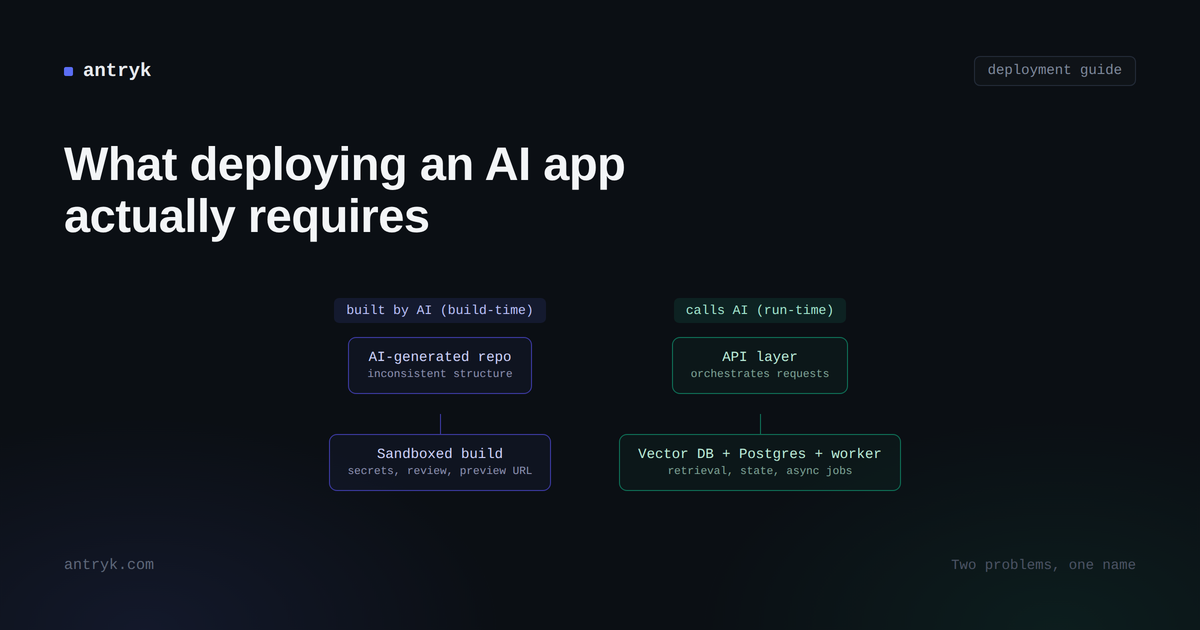
"AI app" refers to two different things — which is why deployment advice is confusing. There is an unstated division that underlies most deployment advice — that an "AI app" can refer to either an application that an AI built, or an application that uses AI at runtime.
These two concepts sound different enough, but they're easily conflated, and they reflect fundamentally different challenges in deployment.
An application built by an AI coding tool — Claude Code, Lovable, Cursor, Bolt.new — is, once deployed, usually just a regular application. A dashboard, internal tool, or CRUD app with a frontend. The AI has written the code, but the running application does not call on a model — the code deployment problem is entirely about trusting and deploying something that may have been written quickly, non-technically (and deployed with speed and convenience in mind), without a human combing over every line.
An application that uses AI at runtime, meanwhile, has different challenges. A human may have written every line of the code, but the application requires a language model, retrieval pipeline, or live inference in order to function. Take that away and it ceases to do what it does — and it's a distributed application problem at this point.
Some applications are both — vibe-coded first, then extended to call an LLM as a feature. But the way deployment advice is often written reflects the assumption that these are one problem when they're really two. They're different enough that they require different considerations when getting deployed.
Deploying an app an AI coding tool built
You wrote a prompt, got a working application from an AI coding tool in minutes, and now it's sitting in a Git repo on your computer. Getting it live isn't technically the hardest part — the code runs. What is hard is everything that a normal deployment assumes a human has already handled.
Why the project structure is unpredictable (and why buildpacks matter)
AI coding tools don't always follow the conventions expected by a given framework. Sometimes there's no Dockerfile, or the dependencies are declared inconsistently, or the entry point is not in a location that a standard build process would expect. A deployment pipeline that assumes a certain, human-written project structure will be stumped by a decent chunk of AI-generated repos.
This is why buildpack-based builds matter more in this context, as they can detect what kind of project they're looking at (Node, Python, whatever) and configure the build, instead of requiring that a Dockerfile already exists. If you're regularly shipping AI-generated applications, a platform that doesn't support Dockerfile-based builds can cause friction.
Why AI-generated code needs to be sandboxed
Perhaps most critically, if the application performs AI logic at runtime (as opposed to build time), you're running code that the AI has not necessarily explicitly reviewed line by line. That represents a different risk profile than what you might assume if you're deploying code that was written and reviewed by an in-house team.
This is why some platforms now isolate execution using microVM-based sandboxing — Firecracker or gVisor, rather than using traditional containers. The idea is simple — if there's misbehavior in that AI-generated code, it should not have a pathway to affecting anything else on that host. It matters more the more autonomy you give the AI tool, and it matters a lot if non-technical team members are the ones doing the deploying.
Secrets management for AI-generated code
AI coding tools are trained on tutorial code, which often hardcodes API keys, since having an API key is a prerequisite for the demonstration. That is fine in a tutorial, but deploying code as-is leaves a possibility that credentials are embedded directly into the repository.
The solution isn't complicated, but it needs to be deliberately considered: secrets get injected at runtime and scoped to the specific service, and not committed to the codebase. Worth checking explicitly rather than assuming that the AI tool has handled it.
Preview environments as a review layer
In a normal engineering workflow, a pull request gets a human review before being merged into production. When a non-technical person is shipping an AI-built internal tool, that step often doesn't happen — there's nobody in a position to actually review the diff. A preview environment fills in that capacity — every change gets its own preview URL before it touches any production code, so that mistakes can be caught at the sandbox level rather than live.
It's not a substitute for code review, but it is a helpful safety net when code review isn't realistically happening.
Deploying an app that calls AI at runtime
This is the older, more familiar problem, but it's gotten more complex as AI-powered features have become more common, rather than novel. The code is fine. The issue is that your application is now a small distributed system, not a deployable unit.
Are you hosting the model or calling an API?
This is the first question to answer, and it informs almost everything that comes afterwards. If you're calling a hosted model API — OpenAI, Anthropic, or similar — you don't need GPU infrastructure, inference servers, or model-specific autoscaling. You're deploying a fairly ordinary application that happens to be making outbound API calls.
If you're self-hosting a model — increasingly common for cost and latency reasons — the calculus changes completely. Model weights are enormous — a 70-billion-parameter model can be well over 100GB — and your container images stop being megabytes and start being gigabytes, which affects your build times and cold-start performance, and how you plan for scaling. Assuming "AI app" automatically means "I need a GPU" is one of the most common and most expensive mistakes people make here.
The four services behind a simple RAG app
If your application retrieves relevant context before generating a response (which describes most production AI features beyond a bare chatbot), you're not deploying one service. You're deploying four.
An API layer that receives requests and coordinates everything else. This is unremarkable, which is exactly why it's not the place where problems usually start.
A vector database that stores embeddings and answers similarity queries. This behaves differently under load than a normal indexed database — query performance scales with the number of vectors and dimensions, not the number of rows, and that informs the way you plan for scale.
Postgres (or an equivalent relational store) storing the ordinary state of your application — users, sessions, chat history, etc. Easy to treat as an afterthought, but it often carries more of the actual logic than expected.
A queue and background worker, because embedding generation and LLM calls are too slow to be run inside a normal request cycle. Without this, your API response time becomes directly tied to whichever model call is slowest in your stack.
None of the four are individually difficult, but what ends up being painful is the seams between them: a vector store from one vendor, Postgres from another, a queue from a third means that every request that touches more than one of them is now dependent on network latency and uptime between the three components — plus separate billing.
Why streaming responses change your hosting requirements
If your application streams tokens out as they generate (as many chat-style interfaces do), your host has to tolerate long-lived connections without buffering or timing out mid-response. It's easy to overlook until you're deploying behind infrastructure that wasn't prepared for it, and every response gets cut off partway through — the detail that breaks the product experience completely in the real world.
Where AI app costs actually hide
Embedding generation and LLM calls are typically billed per token or per call, meaning that a queue backlog isn't only a latency issue — it's a cost spike waiting to happen. If nothing rate-limits how quickly your worker can drain the queue, a burst of usage turns into a burst of your bill, oftentimes right as the invoice is due — if the spike hasn't been noticed.
What to check before picking a deployment platform
Once you know which problem (or combination) you actually have, evaluating platforms can be much more concrete. Questions worth thinking about directly rather than assuming the answer:
Does it match your problem (build-time vs. run-time)?
A platform optimized for shipping vibe-coded internal tools quickly isn't necessarily built to host a vector database and a queue reliably at scale, and vice versa. Match your platform to the shape of what you're actually deploying, rather than just to the fact that "AI" is involved somewhere.
How many separate vendors is your stack actually spread across?
This is worth counting explicitly. Every additional vendor in your stack adds a network hop, uptime guarantee, and separate bill. Some platforms — Antryk included — host vector databases, Postgres, and application deployment together to reduce this kind of sprawl, but running each piece at a specialist vendor is also a legitimate choice, so long as it's an intentional choice.
Managed cloud vs. BYOC vs. self-hosted
Managed cloud gets you running fastest, with the least operational overhead. Bring-your-own-cloud matters when data residency or infrastructure ownership is a hard requirement, common in regulated industries. Self-hosted gives you the most control and lowest fixed cost, with the price of managing the infrastructure yourself. None are universally correct — it depends on your team's size, compliance requirements, and how much work you're willing to do.
The question that determines your setup.
Before you dive into a platform, a pricing page, or an architecture diagram, answer this one question: is the AI in your application at build-time or run-time?
If it's build-time, your priorities are build automation that tolerates messy AI-generated project structure, sandboxed execution for anything still running such code, proper secret injection, and a review layer like preview environments to catch mistakes before they're shipped.
If it's run-time, your priorities are knowing whether you're hosting model weights or calling an API, wiring a vector store and a relational database together without adding unnecessary latency, handling streaming responses correctly, and avoiding a silent cost spike due to background workers.
Ready to Deploy Your AI App?
Building an AI application is only half the journey. The next step is deploying it on infrastructure that can support your application as it moves from prototype to production.
Antryk gives developers a unified cloud platform to deploy, scale and manage modern applications and AI workloads. With Antryk developers can benefit from compute, GPU infrastructure, vector databases, storage, monitoring, custom domains and more all in one place.
Whether you're deploying an AI-powered web application, running an LLM, building a RAG application or scaling an AI workload for production, Antryk provides the infrastructure you need to move from “it works on my machine” to a production-ready application.
Antryk provides you with the infrastructure you need to move from “it works on my machine” to a production-ready application.